
Are you ready to keep your valuable items safe and organized in Minecraft? Building a chest is one of the first and most useful skills you need to master.
Whether you’re a beginner or just want to improve your game, this guide will show you exactly how to build a chest quickly and easily. By the end, you’ll have the storage space you need to carry more, explore further, and play smarter.
Let’s dive in and unlock the secret to making your Minecraft adventures smoother and more fun!
Materials Needed
Building a chest in Minecraft requires just a few simple materials. These materials are easy to find and gather early in the game. Knowing what you need helps you prepare quickly and start storing items.
Wooden Planks
Wooden planks are the main building blocks for a chest. Craft them by placing logs in your crafting menu. Any type of wood will work, such as oak, spruce, or birch.
Crafting Table
A crafting table is essential to build a chest. It expands your crafting grid to a 3×3 layout. Craft the table with four wooden planks arranged in a square.
Logs
Logs come directly from trees and are the raw material for wooden planks. Use an axe to chop down trees faster. Different tree types give different wood colors.
Tools For Gathering
- Axe: Speeds up cutting trees and gathering logs.
- Hands: You can gather logs without tools, but it is slower.
Credit: beebom.com
Crafting A Chest
Crafting a chest is a simple but important skill in Minecraft. A chest stores your items safely. It helps keep your world organized and your treasures secure. You need just a few wooden planks to make one. Knowing how to craft a chest is useful at every stage of the game.
Gathering Wooden Planks
First, collect wood by chopping trees. Any wood type works: oak, birch, spruce, and more. Open your crafting menu and place the wood logs inside. Each log turns into four wooden planks. You need at least eight wooden planks to build a chest.
Opening The Crafting Table
Use a crafting table to make a chest. If you don’t have one, create it first. Place four wooden planks in the crafting grid. This gives you a crafting table. Place it on the ground and right-click to open it. The crafting table shows a 3×3 grid for crafting.
Placing Wooden Planks In The Grid
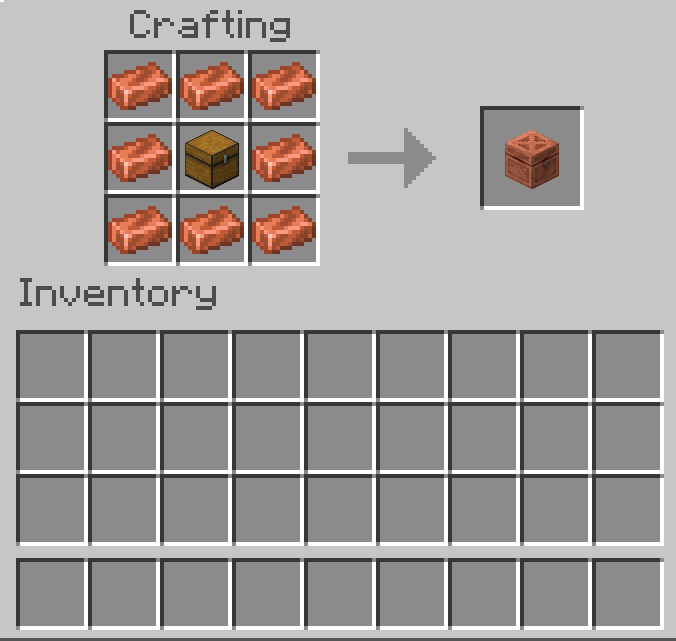
In the crafting table, place eight wooden planks. Fill every box except the center one. The center box must stay empty. This pattern shapes the chest. The order of planks around the empty center is important. After placing planks correctly, the chest appears as a result.
Collecting The Chest
Click the chest icon and drag it to your inventory. Now you have a chest ready to use. Place it anywhere in your world. Open it to store items safely. You can create many chests to expand your storage space.
Double Chest Creation
Creating a double chest in Minecraft expands your storage space significantly. Instead of managing multiple small chests, you get one large chest that holds twice as many items. This makes organizing your valuable resources much easier and saves space in your base.
Gathering Materials
You need wooden planks and sticks to build chests. Crafting chests requires eight wooden planks arranged in a square, leaving the center empty. Make sure you have enough wood by chopping down trees or using a crafting table near your base.
Crafting Single Chests
Open your crafting table and place the wooden planks in all slots except the middle one. This will create one chest. Craft two of these chests to prepare for the double chest setup. Remember, you can craft multiple chests quickly if you have enough wood.
Placing Chests Side By Side
Place one chest on the ground. Then, place a second chest directly next to it, either horizontally or vertically. The two chests will automatically merge into a double chest, showing a larger storage interface when opened.
Using Double Chests Efficiently
Double chests hold up to 54 item stacks, doubling the capacity of a single chest. You can organize your items by grouping similar materials together inside the double chest. Have you tried labeling or color-coding your chests to find items faster?
Common Issues And Fixes
If your chests do not combine, check if you placed them on different block types or if there’s a block between them. You cannot create a double chest if another block or chest is blocking the connection. Moving or adjusting the chests usually solves this problem quickly.
Organizing Your Storage
Organizing your storage in Minecraft can save you countless hours. A well-arranged chest system helps you find items quickly and keeps your gameplay smooth. Without a good plan, you might waste time digging through random stacks of blocks or tools.
Labeling Techniques
Labels are a simple way to keep track of what’s inside each chest. You can use item frames to display a key item on the chest’s front. This gives you a quick visual clue without opening it.
Signs also work great for labeling. Write clear names like “Building Blocks” or “Food Supplies” to avoid confusion. Keep labels short and direct to make them easy to read at a glance.
Try grouping similar items under one label. For example, instead of separate chests for stone and cobblestone, put them both under “Stone Materials.” This reduces the number of chests and makes storage more efficient.
Color Coding Systems
Color coding adds another layer of organization that’s hard to miss. Use different colored wool blocks or banners to mark chests by category. This way, you can spot the type of items just by color from a distance.
Assign colors based on how often you use the items. For example, red for weapons and tools, green for farming supplies, and blue for rare materials. This helps prioritize where you store things and speeds up your searches.
Combine colors with labels to make your system foolproof. You’ll never waste time guessing what’s inside a chest again. What colors would make your storage system the easiest to navigate?
Advanced Storage Solutions
Advanced storage solutions in Minecraft transform your simple chests into powerful, efficient systems that save time and keep your base organized. Once you have the basics down, adding automation can change how you manage your resources and reduce clutter. Let’s look at how you can use hoppers and build automated systems to make your storage smarter and more effective.
Using Hoppers
Hoppers are small but mighty blocks that move items between containers automatically. You can place a hopper underneath a chest to pull items in or connect it to other hoppers for complex item flow. This lets you create sorting systems where specific items go into designated chests without manual effort.
Imagine mining for hours and having ores automatically sorted into separate chests. Hoppers save you the hassle of organizing everything by hand. You just need to place the hoppers correctly—pointing into the chests—and items start moving on their own.
- Place a hopper facing into a chest to funnel items inside.
- Connect multiple hoppers to create item pipelines.
- Use hoppers with furnaces to feed fuel and smelt items automatically.
Building Automated Systems
Automation takes storage beyond simple item movement. By combining hoppers with redstone components like comparators, you can build systems that sort, store, and even distribute your items based on your needs.
One setup I tried was an auto-sorter that directs building blocks to one chest and tools to another. It required trial and error, but the end result saved me hours of inventory management. What items do you find most annoying to sort?
- Use redstone comparators to detect items in hoppers.
- Set up filters with specific items in filter chests to sort automatically.
- Integrate droppers and dispensers to move items further into your base.
Automated storage systems also help when your inventory fills up quickly during long mining sessions or big building projects. Instead of stopping to organize, your system quietly sorts everything while you keep playing.
Credit: beebom.com
Chest Placement Strategies
Chest placement in Minecraft is more than just stacking boxes. It can change how efficiently you access your items and how much you can store in a limited space. Thoughtful placement helps you stay organized and saves you time during your adventures.
Maximizing Space
Placing chests side by side creates double chests, doubling your storage without taking extra room. But did you know you can also stack chests vertically with trap chests or ender chests nearby for additional layers of storage? This trick lets you keep important items accessible while storing bulk materials out of the way.
Try arranging chests in a grid pattern along walls or under stairs to use every inch efficiently. You could even build hidden compartments by placing chests behind paintings or under carpets, keeping valuable items safe and your base tidy.
Optimal Locations
Think about where you use items most often. Placing chests near crafting tables, furnaces, or your bed can speed up your workflow. For example, storing ores and fuel next to your furnace saves time moving back and forth.
Also, consider lighting and safety. Keep chests in well-lit areas to prevent mobs from spawning and potentially destroying your storage. If you explore a lot, having a chest near your spawn point or base entrance means quick access to supplies when you return.
Protecting Your Chests
Protecting your chests in Minecraft is essential to keep your valuable items safe from other players and unexpected threats. Without proper protection, your hard-earned resources can vanish in moments. Let’s look at practical ways you can secure your chests effectively.
Using Locks
Adding locks to your chests can prevent unauthorized access. While vanilla Minecraft doesn’t offer built-in locks, several mods and plugins provide locking mechanisms that you can use.
For example, if you’re playing with mods like “Lockette” or “LWC,” you can right-click your chest to apply a lock. This stops other players from opening it unless they have permission.
Always check if the server supports these mods before relying on them. Without locks, your chests remain vulnerable to theft or accidental opening by others.
Securing In Multiplayer
In multiplayer mode, protecting your chests requires more than just locks. Consider building your chests inside hidden rooms or behind secret doors to keep them out of sight.
Another effective tactic is to use traps or alarms around your storage area. These can alert you if someone tries to break in or steal your items.
Think about how much effort you put into gathering resources. Wouldn’t it be worth investing some time into securing them against other players?

Credit: www.youtube.com
Troubleshooting Common Issues
Building chests in Minecraft can sometimes lead to unexpected issues that disrupt your storage plans. Troubleshooting these problems quickly keeps your gameplay smooth and your items safe. Let’s look at some common challenges you might face and how to solve them effectively.
Fixing Misplaced Chests
Have you ever placed a chest only to find it in the wrong spot? It happens more often than you’d think. The good news is, you can easily fix it by breaking the chest and placing it again where you want it.
Be careful when placing chests next to each other. Placing two chests side by side creates a double chest, which might not be what you intended. If you want single chests, leave at least one block of space between them.
Also, check the orientation of the chest. Sometimes the chest faces the wrong way, making access awkward. You can change this by breaking and repositioning it while facing the desired direction.
Addressing Storage Glitches
Have you noticed items disappearing or not showing up in your chest? Storage glitches can be frustrating, but they often have simple fixes.
First, ensure your game is updated to the latest version, as many bugs are patched regularly. If glitches persist, try breaking and replacing the chest to refresh its contents.
Sometimes, placing chests near certain blocks like furnaces or hoppers causes conflicts. Avoid mixing chests with complex blocks directly adjacent to prevent glitches.
Finally, keep an eye on server lag or connection issues if you’re playing multiplayer. These can cause syncing problems that look like storage glitches but are actually network delays.
Frequently Asked Questions
How Do You Craft A Chest In Minecraft?
To craft a chest, gather 8 wooden planks. Open your crafting table and place the planks in every slot except the center. This creates one chest for storing items safely.
Can Chests Be Locked In Minecraft?
Yes, you can lock chests using a name tag on an anvil. Rename the tag, then apply it to the chest. Only players with the same tag can open it.
How Many Items Fit Inside A Minecraft Chest?
A single chest holds 27 stacks of items. Each stack can vary in quantity depending on the item type. Double chests increase storage to 54 stacks.
What Materials Are Needed To Build A Trapped Chest?
Trapped chests require 1 chest and 1 tripwire hook. Craft the chest first, then combine it with the tripwire hook on the crafting table. It emits a redstone signal when opened.
Conclusion
Building a chest in Minecraft is simple and fun. You just need wood and crafting skills. Chests help you store items safely and keep your world organized. Practice making chests often to get faster. Try building double chests for extra space.
Remember, chests protect your treasures from loss. Keep exploring and crafting to enjoy Minecraft more. Start building now and see how useful chests can be!